
GHIN
Golf Handicap and Information NetworkSports
3.82.69K Reviews
- Version
- 5.4.13
- Installs
- 1.00M
- Age Rating
- Everyone
Screenshots

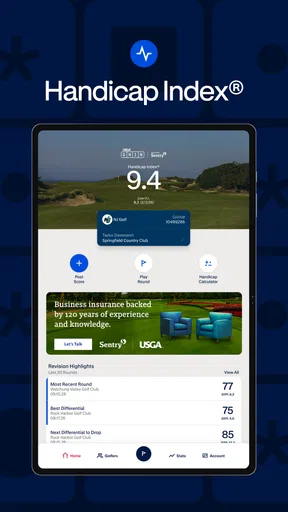
Our Review of GHIN
 Analysis by Appyee
I choose a golf scoring app based on what I actually need during a round: a dependable way to record results, a useful handicap reference, and as little screen time as possible between shots. Those priorities matter more than a long feature list. GHIN is most appealing when your golf life already revolves around an official handicap and you want the scorekeeping and handicap tools close at hand. It is less compelling if you only want a casual round tracker or expect a phone app to replace every piece of golf equipment.
Start with the job you want the app to do
Before switching, I would ask whether I need an official handicap record or simply want to remember how I played. Those sound similar, but they lead to different choices. A general golf scorecard app may be enough for personal notes, while GHIN is aimed at golfers who use the Golf Handicap and Information Network. That distinction is useful: the app is not just a digital place to jot down a number, but part of a handicap-focused routine.
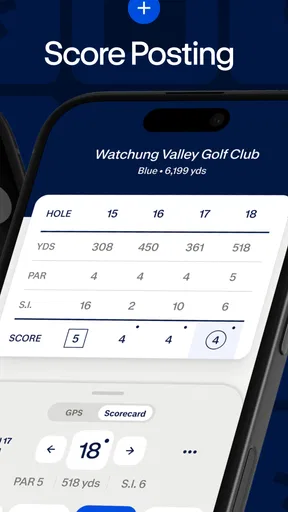
I would also consider how I behave on the course. If I like entering each hole as I go, rather than reconstructing the round afterward, hole-by-hole scoring can make the record more useful and reduce the chance of forgetting details. If I prefer to keep my phone away until the clubhouse, a more minimal approach may suit me better. No scoring app can fix an incomplete or inaccurate entry, so the best workflow is the one I will follow consistently.
Where the handicap tools earn their place
The course handicap calculator is especially helpful when I am playing somewhere unfamiliar. Instead of relying on a number I use at home, I can check the adjustment for the course before comparing scores with playing partners. My practical tip is to do that before the first tee, when there is time to confirm everyone is using the same basis for the round, rather than turning a friendly match into a mid-round arithmetic discussion.
There is a second useful habit: treat score entry as a quick recordkeeping task, not a running analysis session. Enter the result when convenient, then review it later. This keeps the phone from becoming a distraction and makes it easier to catch a missed hole while the round is still fresh. For golfers who are building a steady record, consistency is more valuable than trying to extract a lesson from every individual score.
GHIN is a sports app from the Golf Handicap and Information Network, and its long presence in the category makes it familiar to many golfers. It has a 3.8 average from around 7,800 ratings, with more than a million installs. Those figures suggest a widely used tool with mixed reactions, not a guarantee that every golfer will find the interface or workflow ideal. I would weigh the handicap use case more heavily than popularity alone.
A realistic round, and what to check before leaving home
Picture a weekend round at a course you have not played before. Before setting off, I would check that I can sign in and that my account is ready; discovering a login problem beside the first tee is a poor start. At the course, I would use the calculator to understand the handicap adjustment, keep hole scores current when practical, and use GPS distances as a reference rather than treating them as a precise substitute for course knowledge. Afterward, I would review the entry while I still remember any unusual holes.
That routine also shows why a little preparation matters. A phone battery, a weak connection, or a slow GPS refresh can make a live tool less convenient than a paper card or a dedicated golf device. The app’s offline scoring option is useful for entering results where reception is poor, but I would still avoid assuming every online feature will behave the same way without a connection. If uninterrupted distance readings are central to how I play, I would bring my usual device and regard the phone as backup.
Who will appreciate it, and who may prefer something else
I would recommend GHIN to golfers who need to manage a handicap through the GHIN system, play with others who use it, and want scoring and course-adjustment tools in one place. It can also suit someone who is getting more serious about keeping a reliable history: recording scores consistently is a simple first step toward understanding how rounds vary. Social sharing may be welcome for golfers whose regular group enjoys comparing results, though it is not essential to the core handicap task.
By contrast, a casual player who rarely records rounds may not gain much from a handicap-oriented setup. Someone mainly interested in detailed shot-by-shot statistics, equipment analysis, or advanced practice planning should compare specialist golf apps and devices before committing to GHIN as their main tool. I would not switch simply because another app has a more decorative dashboard; I would switch only if it better supports the specific information I want to collect and the way I play.
What switching really involves
The app is free, rated for Everyone, and currently at version 5.4.9 for devices running Android 5.0 or later. It also offers in-app purchases listed at $49.99 per item. The practical cost to consider is not just the download: GHIN works best for golfers who belong to a club participating in the service, and club-related membership fees may apply. I would check that relationship before building a routine around the app, especially if I am joining a new club or moving from a different handicap arrangement.
Changing scorekeeping tools can also create a small habit cost. A new screen layout takes attention to learn, and moving to a different service may mean adjusting how I share results with my regular group. Before replacing an existing app, I would decide which one will be the record I rely on, then avoid entering the same round in several places unless I have a clear reason. That simple choice prevents scattered records and makes later review easier.
Getting Started with GHIN
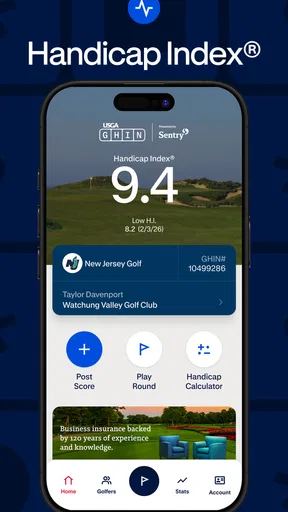
First things first, setting up GHIN is a breeze. After downloading it from your favorite app store, you’ll need to log in with your GHIN number. If you’re not familiar, this is essentially your golfer ID, and you can obtain it through your local golf club. Once you’re in, the app greets you with a user-friendly interface that’s both intuitive and visually pleasing.
Features That Stand Out
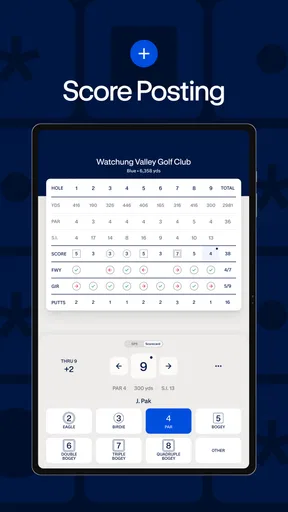
The app’s main feature is its ability to record and track your scores. You can input your scores hole by hole and the app will do the heavy lifting of calculating your handicap index. It’s like having a personal caddy in your pocket, minus the witty banter.
Another standout feature is the course handicap calculator. This handy tool adjusts your handicap based on the difficulty of the course you’re playing. No more scribbling on scorecards trying to figure it out manually. This feature alone has saved my sanity on more than one occasion.
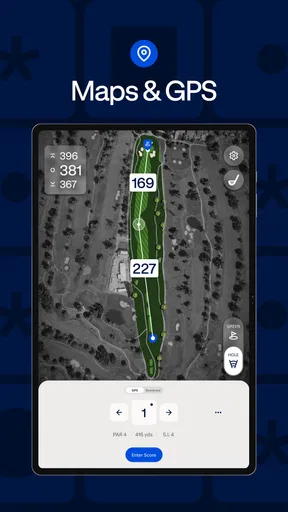
You’ll also find a GPS feature that provides distances to various points on the course. It might not replace your dedicated GPS device, but it’s a nice backup when you find yourself on a new course without your usual gear.
Social Features and Community
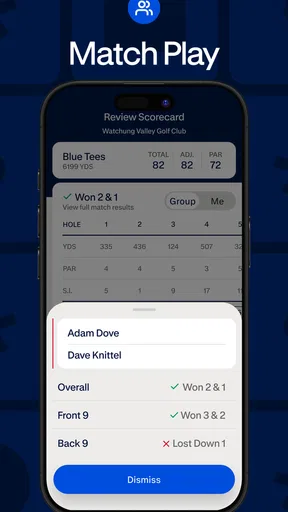
One of my favorite aspects of the GHIN app is its social functionality. You can connect with fellow players, share your scores, and even engage in a bit of friendly competition. There’s something motivating about seeing your buddy’s score and knowing you’ve got to up your game.
The app also includes a news section with the latest golf updates and tips. It’s like having a mini newsstand in your pocket, keeping you informed and entertained.
User Experience and Interface
The app’s design is clean and straightforward. Navigation is smooth, with everything you need accessible within a few taps. The color scheme is easy on the eyes, making long sessions with the app more comfortable. However, I did notice that sometimes the GPS feature can be a tad slow to update, but it’s not a dealbreaker by any means.
There’s also an offline mode, allowing you to input scores even when you’re out of range, which is a lifesaver on those remote courses where cell service is as rare as a hole-in-one.
Membership and Cost
To get the most out of the GHIN app, you’ll need to be a member of a club that participates in the GHIN service. There might be additional fees depending on your club, but the app itself is free to download. It's a small price to pay for detailed insights into your game.
Some might argue that there are free alternatives out there, but the accuracy and reliability of the GHIN system make it a worthwhile investment for serious players wanting to improve their game.
Final Thoughts
All in all, the GHIN app is a fantastic tool for golfers who are serious about tracking their performance. With its comprehensive features, easy navigation, and the ability to connect with other players, it’s more than just an app—it’s your golfing partner.
If you’re looking to take your game to the next level or simply want a reliable way to keep track of your scores and handicap, give the GHIN app a shot. Who knows? It might just be the secret weapon you need to shave a few strokes off your game.
My recommendation
For me, the deciding question is whether an official GHIN-linked handicap is part of the way I play. If it is, the combination of score entry, handicap calculation, and social sharing gives the app a clear purpose beyond acting as a phone scorecard. If it is not, I would choose a simpler tracker or a golf-focused tool that better matches my priorities instead of signing up for a system I may barely use.
The app is free to download and is rated for Everyone, but access to the wider GHIN service may involve club membership costs. That makes it worth checking with your club before treating the app as a complete, no-cost handicap solution. GHIN was released on January 18, 2012, and is developed by Golf Handicap and Information Network; its current version is 5.4.9. Those details matter less than the practical fit: I would install it when its handicap workflow matches my club and playing group, and skip it when I only need occasional score notes.
My overall view is positive with a clear condition. For a golfer who wants a consistent handicap record and will actually enter rounds, it is a sensible companion, especially when playing different courses or sharing results with friends. For someone who wants deep performance analysis, a dedicated GPS device, or nothing more than a quick paperless scorecard, another option may feel more focused. I would use GHIN for the handicap job it is built around, keep a backup plan for a slow GPS day, and let that specific usefulness—not a promise of effortless improvement—decide whether it belongs on my phone.
Verdict
Strengths of GHIN
- User-friendly interface for quick navigation.
- Accurate handicap calculations and updates.
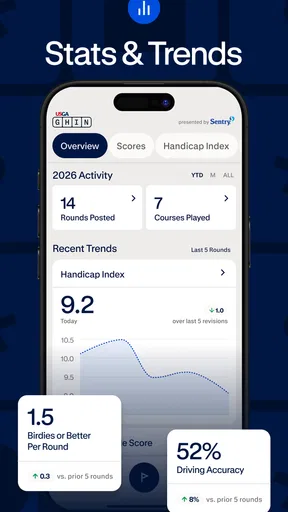
- Easy score tracking with detailed stats.
- Seamless integration with golf courses.
- Reliable performance with minimal bugs.
Limitations of GHIN
- Requires internet for full functionality.
- Limited offline features available.
- Subscription needed for premium features.
- Occasional sync issues with some devices.
- Interface may seem basic for advanced users.
Similar Picks in This Category
View All
BeSoccer: Soccer Live Score
BeSoccer apps4.3

Cricbuzz - Live Cricket Scores
Cricbuzz.com3.7

NFL
NFL Enterprises LLC2.4

Da Fit
MO YOUNG LIMITED3.6

ESPN
Disney4.5

LiveScore: Live Sports Scores
LiveScore Limited4.5
Frequently Asked Questions
What is the GHIN app and what does it offer?
The GHIN app is a comprehensive tool for golf enthusiasts, providing access to official handicap indexes, score tracking, and course ratings. It offers features like stat tracking, GPS for courses, and the ability to post scores directly from your phone. It's designed to enhance your golfing experience with easy-to-use navigation and real-time updates.
Is the GHIN app available for both Android and iOS devices?
Yes, the GHIN app is available for download on both Android and iOS platforms. Users can find it on the Google Play Store for Android devices and the Apple App Store for iOS devices. Ensure your device meets the app's compatibility requirements for a smooth installation and user experience.
Does the GHIN app require a subscription or membership?
While the GHIN app itself is free to download, it requires users to have an active USGA/GHIN membership to access the full range of features, including handicap tracking and posting scores. Membership details and costs can vary by golf association, so check with your local organization for specific information.
How user-friendly is the GHIN app for beginners?
The GHIN app is designed with an intuitive interface, making it accessible even for beginners. It offers straightforward navigation with clear instructions and tooltips, ensuring users can easily post scores, check handicap indexes, and explore course details. Tutorials and FAQs within the app further assist new users in maximizing the app's features.
What kind of support is available for the GHIN app?
The GHIN app provides robust support through its in-app help section, including FAQs and troubleshooting guides. Users can also contact customer service via email or phone for assistance. Regular updates ensure the app runs smoothly and incorporates user feedback to enhance functionality.
